Personal Banking FAQs
Get answers to your questions about Vista Bank's personal banking services.
Personal Checking
The Vista Bank routing number is 101002716.
Call our Client Services & Solutions team at 877.88VISTA.
Overdraft Privilege comes with eligible accounts as part of our standard overdraft practices. Visit our Overdraft Protection page for more information.
To apply for a checking or savings account, you will need the following information for each account owner:
- Social Security number
- Driver's license or State ID
- Home address
- Email address.
- If you want to transfer money from an account at another bank, you will also need the account information and routing number found on your checks.
Access your account online, through mobile banking, by calling 877.88VISTA, or by visiting your local banking center.
Non-U.S. citizens can open an account by visiting a banking center. Please call your local banking center for additional details.
Hours vary by location, and can be found on our locations page.
Please visit our locations page.
You can update your information through online banking, by visiting your local banking center or by calling our Client Services & Solutions team at 877.88VISTA.
Most funds are available next business day. Please call our Client Services & Solutions team at 877.88VISTA for more information about when your funds will be available.
Access your account online, through mobile banking, by calling 877.88VISTA or by visiting your local banking center.
Personal Checking: Checks
How do I order checks?
Order new checks through online banking, or by visiting your local banking center.
How much does it cost to order checks?
Prices on checks vary by the checks selected. Premium Checking clients are offered a discount on checks, for more information call your local banking center.
Can I view check images online?
How do I deposit checks?
We offer many ways to deposit checks. You can deposit at your local banking center, through mobile banking, or at an ATM.
Debit Card FAQs
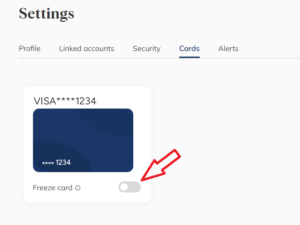
How do I temporarily lock my card?
How do I order a new debit card?
To order a new debit card, please visit your local banking center, or contact us at 877.88VISTA
What should I do if my card is lost, stolen or I suspect fraudulent debit card transactions?
Please call your local banking center or our Client Services and Solutions team at 877.888.4782 and select option 7.
How do I dispute a transaction on my debit card?
Please call your local banking center or our Client Services and Solutions team at 877.888.4782.
What is a chip card?
Are there transaction fees when I use my debit card?
What are the ATM transaction fees?
There is no fee for using Vista Bank ATMs if you are a client, for a list of Vista Bank ATMs please click here. For a list of other ATM fees, please contact your local banking center or call Client Services & Solutions at 877.88VISTA.
How do I change my debit card PIN or request a new PIN?
Please call your local banking center or our Client Services and Solutions team at 877.88VISTA. If after hours, please call 866.392.9952.
What do I do if I plan to use my debit card during international travel?
Please contact your local banking center before traveling.
What is the difference between signing and using my PIN to authorize a debit card purchase?
Signing for purchases is safer because it prevents scammers from being able to "skim" your PIN number, or by looking over your shoulder to steal your number. For more information about protecting your PIN, visit the security section.
Can I set up alerts to track my debit card and account activity?
There are many options for alerts, please visit the "Manage Alerts" section after signing in to online banking for a complete list.
Online/Mobile Banking & Bill Pay
What are the features and benefits of Online & Mobile Banking?
Vista Bank Online Banking and the Vista Mobile Banking app make it easy for you to bank anywhere with convenient features such as:
- View balances and recent transactions
- Pay recurring and one-time bills
- View statements
- Send money to people you know and trust with Zelle®
- Transfer funds between internal and external accounts
- Lock your debit card with card controls
- Self-service username and password resets
- Mobile check deposit (mobile app only)
- Enhanced small business features, including a convenient username toggle between Personal and Small Business accounts
What is Zelle® and how does it work?
Zelle® is a convenient way to send and receive money with friends, family and others you trust. Check our Zelle® information page for more details.
Is there a fee for using Online Banking?
No! Online and Mobile Banking are complimentary tools for our clients.
How do I access my account in Online Banking?
You can access Online Banking by visiting this website, clicking the ‘Login’ button, and selecting ‘Personal Online’ or ‘Small Business Online.’ For Mobile Banking, you can download the Mobile Banking app from the Apple Store or the Google Play Store.
How do I enroll in Online Paperless Statements?
You may easily convert to Online Paperless Statements during the enrollment process when you first enroll in Online or Mobile Banking. You may also enroll within Online Banking anytime by selecting your name in the top right corner, then Enroll under Paperless Statements, or from the Mobile Banking app by selecting ‘More’ then ‘Go Paperless’. You may login at any time to view your statements and notices, and statements are available online for up to 7 years.
Can I access my Online Paperless Statements from previous years?
How do I download transactions?
Transactions can be downloaded when viewing your account details page by selecting ‘Download’ above your transactions. You can then select your preferred formatting and time frame in which to download.
In the Mobile Banking app, where do I see my Account Details?
On our mobile app, after signing in, you can see your transactions by clicking on the account. You will be presented with a list of transactions in the ‘Transaction History’. Additionally, your account details can be viewed on the same screen by selecting the ‘Account Details’ button located above your transactions. Here, you will see your full account number, routing number, interest rate (if applicable) and current year to date and previous year dividends.
How do I deposit checks in mobile banking?
The mobile app provides a fast and easy way to make deposits on the go. Simply login to Mobile Banking and select ‘Deposit’ from the menu along the bottom of the screen. Follow the on-screen instructions to deposit your check(s).
Can I transfer funds between Vista Bank and non-Vista Bank accounts?
What types of transfers can I make in Online and Mobile Banking?
You can send and transfer money in a variety of ways, including Internal Transfers between your accounts and you can also send and receive money through Zelle® from Online Banking or the Mobile Banking app.
How do I pay my loan?
If paying from an internal account, payments can be made from Online or Mobile Banking under the transfer section. You can also continue to utilize our Quick Pay feature to pay from an external account.
Where do I see future-dated scheduled transfers?
You can see future scheduled transfers by clicking on the account. They will show at the top of the transaction list within Online Banking and on the Mobile Banking app.
How do I add an external bank account for transfers?
You can add an external account for transfers to/from your Vista Bank account(s) by selecting ‘Transfer Funds’ in the top-right of your screen in Online Banking, then click the ‘Transfer’ option on the "How do you want to send money?" screen. You can then add the account by authenticating with credentials or using micro deposits. If using the micro-deposit option, on the mobile app you can verify the micro-deposits by selecting ‘More’ in the bottom right, then selecting ‘Linked Accounts’. Under ‘External Accounts’ you will have the new relationship listed with blank spaces for the first amount and second amount. Once entered, selecting ‘Verify’ will complete the process. From Online Banking, you can click on your Name in the top right corner, then ‘Settings’ and ‘Link Accounts’.
Where should I expect to see my External Transfer?
If I've forgotten my password for Online or Mobile Banking, how can I reset it?
We now provide a self-service password reset feature in online and mobile banking that will make it faster and more convenient to securely reset your password. You can also call our Client Services and Solutions team at 877.88VISTA.
How do I establish Alerts?
To set up alerts in Online Banking, click "Manage your security alerts" in the Tools section in the navigation menu on the left side of the screen. In the Settings menu that appears, click the "Alerts" tab. If on a mobile device select ‘More’ and then ‘Alerts’.
How do I lock my debit card if I misplace it?
If your card has been lost or stolen, please call your local banking center or our Client Services and Solutions team at 877.888.4782. and choose option 7.
You can also log in to Online or Mobile Banking to lock your card. In Online Banking, click the 'Cards' option on the left side of the screen and you will see the cards tied to your account. Click the 'Freeze card' button to lock your card.

How do I change my Username?
You can easily change your Username/Password and update your Email Address/Phone Number by clicking the ‘Settings’ (gear icon in the top right corner) then ‘Profile’ in online banking or by clicking ‘More’, then ‘Profile’ in the mobile banking app.
I'm a Small Business User, how do I toggle between accounts?
We provide the ability to link your personal and business profiles together for easy connectivity. When you login to online banking, select ‘Remember This Device’ then select your name in the top right corner of the screen. Select ‘Link another profile’ and be directed to login to the other profile(s) you access. You will be prompted with a onetime security code to complete the linking process. You can then simply select your name in the top right corner and see a breakdown of any linked profiles.
How do I use online Bill Pay?
How do I cancel a bill payment?
From the ‘Pending Payments’ section on the Bill Payments page, click ‘Cancel’ for the appropriate payment, if it has not yet been sent. The ‘Cancel Payment?’ Window will appear. Click ‘Cancel Payment’ to complete cancelling your payment.
How do I set up recurring or scheduled transfers?
How do I add an External Transfer account?
You have the option to instantly add or manually add an external account to your profile in either online banking or the mobile app. If you do not see your bank on the list, you will need to add using the manual process. If adding manually, you will need to verify micro-deposits under ‘Settings’ then ‘Linked Accounts’.
Can I login using fingerprint or facial recognition on the Mobile Banking app?
Yes, if your phone supports fingerprint or facial recognition such as Touch ID/Face ID, you can enable in the app, by logging in, selecting ‘More’, then under ‘Login & Security’ you can unlock with either your fingerprint or facial recognition.
How do I enable multi-factor authentication (MFA)?
How do I logout of Online Banking?
Credit Cards
Can I set up alerts to track my credit card usage and account activity?
Yes, please login to your credit card account here for more information on the alerts you can set up for your credit card.
What credit cards do you offer?
We offer a variety of credit card options, please see visit our page with information on our credit cards and rewards.
How do I request a credit line increase?
Please login to your credit card account here, or call Elan Financial Services.
How do I transfer a balance?
Just follow these three easy steps:
- Login to your credit card account
- From the "Your Accounts" Page, select the desired credit account. Or from "Services" select "Balance Transfer" from the "Account" section.
- Select the "Request a Convenience Check or Balance Transfer" link
Personal Checking: Safe Deposit Box
To open a safe deposit box, you will have to visit your local banking center. Please visit our locations page to find the location nearest you that offers Safe Deposit Boxes.
To make changes to your safe deposit box, you will have to visit your local banking center. Please visit our locations page to find the location nearest you that offers Safe Deposit Boxes.
To close your safe deposit box, you will have to visit your local banking center. Please visit our locations page to find the location nearest you that offers Safe Deposit Boxes.
Savings Accounts
What savings accounts does the bank offer?
We offer a range of savings accounts to choose from. Check out your Savings Account options today.
Do you offer education savings accounts?
Yes. We are proud to offer Coverdell Savings accounts to help you save and pay for qualified elementary, secondary, or post-secondary education expenses.
Is a minimum deposit required to open a savings account?
Our savings accounts have minimum balances to open. For more information, check out our Savings page.
How do I apply for a savings account?
You can visit a banking center near you or apply online.
When do I start earning interest for a savings account?
How is interest paid on my savings account?
What is a certificate of deposit?
Certificates of Deposit (CDs) are accounts where you place money that is not readily accessible for a set period of time in order to earn more interest. For more information, please contact your local banking center.
Personal Checking: Statements
Our statements are available in paper form or online.
Enrolling in electronic statements is a safer and more convenient way to receive your monthly bank statements because you receive your statements as soon as they cut, and your account information does not sit in your mailbox.
You can enroll in electronic statements by signing into online banking, and clicking the "Customer Service" tab in the mega menu, or by visiting your local banking center.
Electronic statements are available for the previous 7 years.
Personal Checking: Wire Transfers
Outgoing wires are initiated at your local banking center.
Personal Borrowing: Home Equity
To apply for a home equity loan or line of credit please visit you local banking center.
A home equity loan is a one-time lump-sum loan, often with a fixed interest rate and a home equity line of credit is a line of revolving credit with an adjustable interest rate.
You can access your funds at your local banking center, through online banking or through mobile banking.
You can pay your home equity loan or line of credit at your local banking center, through automatic payment or by mail.
The draw period is 10 years. If the minimum monthly payment amount is paid you may have balloon balance owed and due at the loan maturity date.
The loan-to-value ratio is up to 90%, based on credit score, debt to income ratio, collateral value and overall loan amount. Please contact your local banking center for more information.